

Your store may be selling more than it did a year ago, but that doesn’t always feel like progress. Orders come in through one system, inventory lives in another, shipping updates lag behind, and the mobile experience still feels like something you meant to fix three months ago. The result is familiar. You spend more time patching problems than improving the business.
That’s usually the point where a basic storefront stops being “good enough.” It may still process orders, but it no longer supports growth. Search rankings stall, checkout friction shows up in support emails, and even simple changes start requiring workarounds.
That’s why e-commerce development solutions matter. They’re not just design projects. They’re the systems, integrations, workflows, and performance decisions that turn an online store into a reliable operating platform. The opportunity is large and still growing. The global e-commerce development service market was valued at approximately USD 0.54 billion in 2024 and is projected to reach USD 1.08 billion by 2033, growing at about 8% CAGR. Businesses are investing because better digital infrastructure directly supports better sales operations.
Growing Pains Your Online Store Will Face
Most online stores don’t break all at once. They get harder to run.
A business starts with a simple setup. That’s often the right move. You need to launch, validate demand, and start taking orders. But once product lines expand, promotions get more frequent, and customer expectations rise, the weak points show up fast. Product data becomes inconsistent. Staff members make manual updates in too many places. Customers hit friction on mobile. Marketing brings traffic, but the site doesn’t convert the way it should.

What strain looks like in practice
These problems usually appear in a few predictable ways:
- Mobile complaints increase: Customers can browse, but filtering, checkout, or account access feels awkward on a phone.
- Inventory confidence drops: Staff stop trusting what the site says is in stock, so they double-check manually.
- Simple updates take too long: New collections, new campaigns, and price changes become mini projects.
- Reporting gets muddy: You can’t easily see which channels, products, or audiences are producing real results.
- Support volume rises: Questions about order status, stock availability, and checkout issues take time away from growth work.
None of that means your business is failing. It usually means the business has outgrown the original setup.
Practical rule: If your team is creating manual workarounds every week, the store isn’t just inconvenient. It’s limiting revenue.
Why this keeps happening
A lot of businesses assume their problem is the homepage design. Sometimes it is. More often, the issue runs deeper. The store wasn’t built to support how the business operates. It may not connect cleanly with payment tools, shipping systems, CRM workflows, or internal processes. In specialized sectors, the gap is even wider because generic platforms rarely account for industry-specific compliance needs or operational quirks.
The fix isn’t always a total rebuild. Sometimes it’s a better architecture, cleaner integrations, or a smarter development roadmap. But in every case, the solution starts by treating the store like a business system, not just a website.
Choosing Your E-commerce Foundation
The foundation you choose affects almost everything that comes later. Cost. Flexibility. Speed to launch. Maintenance. What your team can manage internally. What has to be custom built.
The easiest way to think about it is this. A hosted platform is like renting a furnished apartment. A headless commerce setup is like designing a custom home on a proven structural frame. A full custom build is like building from the ground up on your own lot.
Hosted platforms for faster launches
Hosted platforms such as Shopify work well when a business needs to get online quickly and wants the platform owner to handle much of the infrastructure. That usually means easier setup, faster deployment, and fewer technical decisions up front.
That simplicity is valuable. It’s often the right fit for straightforward catalogs, standard checkout flows, and teams that don’t want to manage hosting, updates, and platform maintenance. But there are trade-offs. Custom business logic can get awkward. Integration requirements can become expensive or clumsy. And once the business starts asking for nonstandard workflows, the platform can feel restrictive.
Headless commerce for flexibility without chaos
Headless commerce separates the front end from the back end. That matters because your customer experience doesn’t have to be constrained by the presentation layer of the commerce engine. The back end can manage products, checkout, and orders, while the front end is built for speed, UX, and channel flexibility.
That’s one reason it keeps gaining ground. According to BigCommerce’s guide to ecommerce website development, headless commerce can reduce page load times by up to 30 to 50 percent compared to traditional monolithic setups and handle 10x higher traffic spikes without degradation. For growing brands, that’s not just a technical detail. It affects user experience during promotions, launches, and seasonal surges.
If you’re weighing architectures, this ecommerce platform comparison is useful for narrowing down what fits your business model.
Headless is strongest when the business wants freedom on the customer-facing side but doesn’t want to reinvent every back-end function.
Full custom builds for specialized operations
A full custom build makes sense when the business model itself is unusual. That could mean complex pricing, gated product access, unusual user roles, regulated purchase flows, or systems that need to connect tightly with internal software.
This route gives you the most control. It also asks the most of you. Custom platforms require disciplined planning, stronger documentation, and a realistic support plan after launch. If the business doesn’t need that level of control, a full custom build can become more platform than the team needs.
E-commerce development approaches compared
| Factor | Hosted Platforms (e.g., Shopify) | Headless Commerce | Full Custom Build |
|---|---|---|---|
| Speed to launch | Fastest option for most teams | Moderate, since front end and back end must be connected | Slowest, because everything is defined and built around your requirements |
| Upfront complexity | Lower | Moderate to high | Highest |
| Design freedom | Good within platform limits | High | Very high |
| Scalability | Solid for many businesses | Strong for growing and multi-channel brands | Strong when engineered well |
| Integration flexibility | Depends on platform ecosystem | High | Very high |
| Maintenance burden | Lower for internal teams | Shared between platform and custom front-end needs | Highest responsibility on the business or development partner |
| Best fit | Standard commerce operations | Growth-focused brands that need better UX and flexibility | Specialized operations with uncommon business rules |
What works and what doesn’t
What works is matching the platform to the actual business. What doesn’t work is choosing based on trends alone.
A hosted platform works when the business needs speed, standardization, and a manageable admin experience. Headless works when performance, unique UX, and multi-channel delivery matter enough to justify the added complexity. Full custom works when off-the-shelf systems keep forcing bad compromises.
The wrong choice usually looks impressive in a proposal and painful in daily operations.
Essential Features For a Modern Online Store
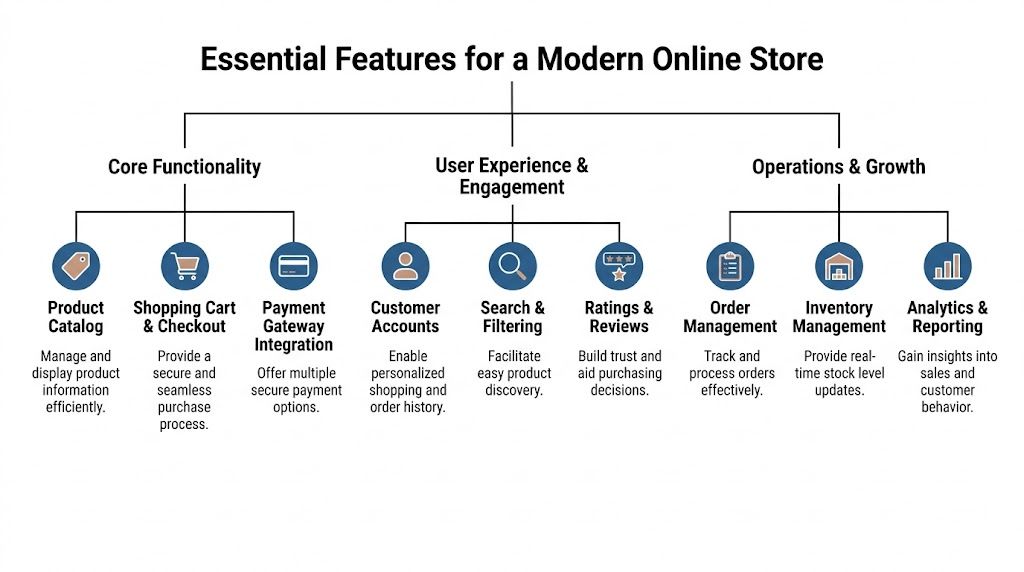
An online store doesn’t need every feature on day one. It does need the right ones. The essentials are the parts that remove friction for customers and reduce operational drag for your team.
The features that carry the business
A modern store should cover a few essential elements well.
- Payment gateway integration: Customers need a checkout they trust. That means secure, recognizable payment methods and a clean path from cart to confirmation. If your checkout is clumsy or asks for too much, customers hesitate. A practical guide to integrate payment gateway decisions can help you think through compatibility and workflow implications before development starts.
- Product catalog and search: If customers can’t find products quickly, the rest of the site doesn’t matter much. Categories, filters, variants, and search behavior need to reflect how people shop.
- Order management: Teams need a clear way to process, update, and resolve orders without bouncing between disconnected tools.
- Customer accounts: Repeat buyers expect order history, saved information, and basic account control.
- Analytics and reporting: You need visibility into sales behavior, not just order totals.
Inventory is where many stores lose trust
Inventory management is one of the clearest examples of where technology choices affect customer confidence. According to CodeBrightly’s overview of custom ecommerce development, stock discrepancies and overselling contribute to $1.1 trillion in global retail losses annually, and integrating inventory APIs can improve order fulfillment accuracy to 99.5% while reducing cart abandonment.
That tracks with what operators see every day. If a customer places an order for something that isn’t available, the damage goes beyond one refund. Trust drops. Support tickets rise. Staff spend time apologizing instead of selling.
Reliable inventory isn’t a “nice to have” operational upgrade. It shapes how believable your store feels.
Features that help after the sale
Many stores are built to get the order and then leave the team to sort out everything that follows. That’s backwards. Good e-commerce development solutions also support post-purchase operations.
A few examples matter more than flashy add-ons:
- CRM integration helps track repeat customers, segment audiences, and support follow-up marketing with cleaner data.
- Shipping and fulfillment connections reduce manual handoffs and cut down on address, label, and tracking issues.
- Returns workflows keep service from becoming chaotic when order volume grows.
- Review collection gives future buyers confidence and gives your team direct feedback on product and service issues.
What doesn’t work is bolting on too many apps without a plan. That often creates duplicate records, inconsistent reporting, and fragile checkout behavior. A leaner stack with cleaner integrations usually performs better than a crowded stack that tries to solve everything with plugins.
Optimizing For Performance and Conversions
A store can look polished and still underperform. Customers don’t judge only by branding. They judge by speed, clarity, and whether the site works well on the device in their hand.

That device is usually a phone. DesignRush reports that mobile commerce is projected to account for 59% of all eCommerce sales, or USD 4.01 trillion, in 2025, and smartphones drive nearly 80% of retail website visits. If your store was designed desktop-first and “made responsive” later, customers will feel it right away.
Mobile-first means more than responsive
A responsive layout isn’t enough by itself. Mobile-first commerce means the important actions are easy to complete with one hand, on a small screen, under less-than-perfect conditions.
That changes design decisions:
- Navigation has to stay simple: Large menus and cluttered category trees feel manageable on desktop and frustrating on mobile.
- Forms need restraint: Checkout should ask for what’s necessary and no more.
- Buttons and filters must be easy to use: If tapping feels awkward, shoppers drop off.
- Page weight has to be controlled: Heavy media, bulky scripts, and unnecessary app code slow everything down.
Speed affects conversions before marketing ever does
A lot of teams focus first on traffic acquisition. That matters, but a slow site wastes the traffic you already paid for or worked hard to earn. Performance work often produces some of the most practical gains because it improves the experience for every visitor.
The basics still matter. Compressed images. Cleaner templates. Fewer blocking scripts. Smarter loading of reviews, chat tools, and third-party widgets. Better architecture on the front end. Even simple product pages can become sluggish when too many apps compete for the browser.
For teams trying to optimize website conversions, it helps to treat speed and usability as conversion work, not just technical cleanup.
A store doesn’t lose sales only at checkout. It loses them in the first few seconds when pages hesitate and the path feels uncertain.
Visibility starts with structure
Search performance isn’t separate from development. It’s tied to how the site is built. Clean URLs, sensible category architecture, strong internal linking, crawlable content, and usable product copy all support search visibility.
An e-commerce site also needs stable technical foundations so marketing teams aren’t forced into constant workarounds. If collection pages can’t be optimized properly, if product variants create messy duplication, or if the platform produces bloated templates, SEO work becomes slower and less effective.
A useful walkthrough on the subject is below.
What actually improves results
What works is a site that loads quickly, guides shoppers cleanly, and lets search engines understand what each page is about. What doesn’t work is chasing aesthetic trends while the core experience remains heavy, confusing, or hard to use on mobile.
Performance and conversion work should feel practical. Less friction. Better product discovery. Cleaner checkout. More confidence.
Navigating Security and Industry Compliance
Security problems rarely start with dramatic failures. They usually begin with small assumptions. A plugin was “probably fine.” A form collected more information than it should have. A payment workflow passed through tools nobody fully reviewed. Then the business had to respond under pressure.
For e-commerce operators, security and compliance aren’t side topics. They shape the architecture from the beginning.
PCI, privacy, and operational discipline
Any store that accepts credit card payments needs to take payment handling seriously. Even when you use established processors, the way checkout is implemented still matters. So do access controls, plugin choices, vendor reviews, and how customer data is stored and shared across systems.
Privacy requirements raise another layer of responsibility. If you sell across regions, collect account data, or run marketing workflows tied to personal information, your forms, policies, and data handling need to reflect that. Businesses often think of compliance as a policy page problem. It’s usually a development and operations problem first.
A solid set of website security best practices helps teams catch weak spots before they turn into incidents.
Healthcare and nonprofit risk is different
Generic commerce advice often misses the realities of regulated organizations. Healthcare providers may need to separate shopping activity from protected health data, design intake and payment flows carefully, and control who can access what internally. Nonprofits may collect donor, member, or event registration data that deserves tighter handling than a standard retail checkout.
That’s why generic themes and plug-and-play stacks can become risky. They may work for a boutique selling apparel. They’re often less suitable for clinics, associations, and organizations with legal or reputational exposure tied to data handling.
Chargebacks add another operational risk layer. For merchants evaluating prevention workflows, this guide to Shopify chargeback protection is a practical reference because it frames the issue in terms of process, documentation, and platform behavior.
Security gets expensive when it’s treated as a patch. It’s far more manageable when it’s built into discovery, architecture, and launch planning.
What compliance looks like in real work
In practice, secure e-commerce development solutions often involve choices like these:
- Limiting sensitive data collection: If the store doesn’t need certain information, don’t collect it.
- Segmenting systems carefully: Payment, customer records, internal admin tools, and regulated information shouldn’t all sit in one casual workflow.
- Reviewing third-party tools: Apps and plugins can extend functionality, but each one creates a trust decision.
- Defining permissions clearly: Staff should only access what their role requires.
The strongest projects don’t bolt compliance on at the end. They make security part of the project scope from the first planning meeting.
Real-World E-commerce Solutions for Your Industry
The right build depends on what the business does. A local retailer, a medical practice, and a nonprofit may all need online payments, but the similarities end quickly once you get into workflow, compliance, and user expectations.

Local retail and specialty products
A small retailer in Tennessee may not need enterprise software. But they often do need better execution than an out-of-the-box setup provides. A boutique selling apparel, gift items, or regional goods might need local pickup, better filtering, cleaner merchandising, and a site that feels distinct instead of template-driven.
In those cases, a practical e-commerce solution often blends a manageable back end with a front-end experience that feels more custom. That can help a local brand compete on usability and presentation without taking on unnecessary complexity.
What tends to fail here is overbuilding. If the product model is straightforward, the project should stay focused on merchandising, mobile UX, search visibility, and operational clarity.
Healthcare commerce needs tighter boundaries
Healthcare is a different category entirely. A clinic selling approved products, collecting payments for services, or offering patient-facing scheduling tied to paid workflows has to think beyond standard storefront features.
Retailist notes that non-compliance fines for data breaches average $1.5M per HIPAA violation, which is why regulated organizations need bespoke solutions that integrate security from the discovery phase. That doesn’t mean every healthcare site needs a fully custom platform. It does mean teams should be careful about forms, data flow, user permissions, and what systems are connected to what.
A strong healthcare commerce build usually separates concerns clearly. Product browsing may be public. Payments may route through a secure processor. Sensitive data may stay out of the storefront entirely or be handled in a controlled environment.
The best healthcare commerce projects are designed around restraint. They collect what’s needed, protect what matters, and avoid blending clinical data with convenience features.
Nonprofits and membership organizations
Nonprofits often get underserved by standard e-commerce platforms because their “store” isn’t just a store. They may need event registration, donor management, sponsorship options, recurring contributions, member access, merchandise sales, and confirmation workflows that support staff as much as donors.
That kind of project usually works best when the team maps the user journey from both sides. The donor or member needs a simple experience. The organization needs clean records, manageable admin tools, and fewer manual follow-ups.
A registration system tied to payments is a good example. The public-facing experience may look simple, but behind it there may be attendance limits, category-based pricing, sponsor logic, and post-registration communication needs. Generic storefront tools can struggle there because they were built for product carts, not organizational workflows.
Startups and organizations in transition
Some businesses aren’t launching from zero. They’re rescuing a store that was built too quickly, inherited from another vendor, or patched together over time. Those projects often need triage before transformation.
The first job is usually clarifying what the business needs the platform to do well. Not every issue requires a rebuild. Sometimes the fix is restructuring the catalog, simplifying checkout, replacing fragile integrations, or cleaning up the admin side so the team can move faster.
That’s what good e-commerce development solutions look like in practice. Not buzzwords. Better fit.
Planning Your Project and Your Next Step
Most e-commerce projects go off track before design starts. The issue isn’t usually effort. It’s unclear scope. A business says it needs a new store, but what it really needs might be a platform migration, better search and filtering, cleaner integrations, or a checkout rebuild.
Start by defining the business problems in plain language. Are customers struggling to complete orders? Is staff spending too much time updating products? Are reporting gaps making marketing decisions harder? Is compliance shaping what the platform can and can’t do? Those answers shape the project far better than a generic feature wishlist.
Scope the business first
A useful planning pass usually covers these questions:
- What must the store do on day one: Focus on essential workflows, not every future idea.
- Which systems must connect: Payment processors, shipping tools, CRM platforms, donor systems, ERPs, or scheduling software.
- Who manages content after launch: The admin experience matters more than many teams expect.
- What can’t break during migration: Product data, customer accounts, order history, SEO-critical pages, and tracking.
If you’re moving from an older platform, content and URL planning deserve special attention. A migration can improve performance and usability, but a careless one can create broken links, lost product data, and reporting confusion.
Budget and timeline decisions
Budgets vary because the work varies. A straightforward platform implementation is a different project from a headless build or a custom system for a regulated organization. The biggest drivers are usually integration complexity, design ambition, data migration needs, and how unusual the business logic is.
Timelines follow the same pattern. Projects move faster when requirements are clear, product data is organized, and decision-making stays active on the client side. They slow down when teams try to redesign branding, rewrite operations, and rebuild the store all at once.
A few planning habits help:
- Separate launch requirements from later enhancements. That keeps version one realistic.
- Audit your current content and data early. Product cleanup always takes longer than expected.
- Decide who owns approvals. Too many stakeholders can stall progress.
- Plan post-launch support before launch. Stores need monitoring, updates, and refinement.
What a good partner should help you do
A capable development partner shouldn’t just ask what pages you want. They should help you identify trade-offs, challenge unnecessary complexity, and protect the parts of the business that already work. Good planning reduces risk. It also saves money because fewer wrong assumptions make it into development.
You don’t need to have everything figured out before starting the conversation. You do need a clear picture of where the current store is creating friction.
Ready to turn your ideas into a practical, scalable online store? Let’s talk. Call us at 731-402-0402 or send us an email to start the conversation.
If you want a team that can think through platform choice, integrations, performance, and compliance with you, Studio Blue Creative is a strong place to start. They work with small businesses, healthcare organizations, nonprofits, and growing brands that need e-commerce development solutions grounded in real operational needs. If your current store feels harder to run than it should, call 731-402-0402 or reach out by email and start the conversation.
Find out if ChatGPT recommends your business.
Right now, your customers are asking AI for recommendations. The AI is naming somebody. Is that name yours? Run our free AEO Scorecard — we test 3 of your real queries against ChatGPT and Claude and email you a personalized report.
