
When we talk about website ADA compliance requirements, we're really talking about making sure your site is open and usable for everyone, including people with disabilities. The primary guide for this is the Web Content Accessibility Guidelines (WCAG).
Think of it like adding a ramp to your physical storefront. By creating an accessible entrance, you're not just complying with a rule; you're welcoming a huge group of potential customers and avoiding serious legal risks. In today's digital-first world, it’s a positive and essential part of doing business well.

Why Website ADA Compliance Is a Business Essential
Imagine your website is your digital storefront. If entry requires navigating a complex, mouse-only menu, you've just turned away every customer who relies on a keyboard. Website ADA compliance is the digital equivalent of that ramp, ensuring everyone can come in, explore, and feel welcome.
An inaccessible website creates frustrating, often impossible, barriers for millions of Americans. For someone with a visual impairment using a screen reader, a site without proper image descriptions is like walking into a store where none of the products have labels. For a person with a motor disability who can't use a mouse, a site that isn't keyboard-navigable is a dead end.
It's Far More Than a Legal Box to Check
While meeting these requirements is the best way to avoid legal action, the real goal is to connect with more people. The digital world has seen a significant rise in accessibility lawsuits, turning what some view as a technical task into a costly business reality.
The numbers are eye-opening. Recent years have seen thousands of ADA website compliance lawsuits filed annually. This isn't a passive threat; it's an active area of litigation that affects businesses of all sizes, especially small and mid-sized companies. These businesses often face demand letters leading to expensive settlements—costs that are almost always higher than proactively making a site accessible from the start.
The Strategic Advantage of an Accessible Website
When you shift your perspective from compliance as an expense to an investment, the benefits become clear. An accessible website isn't about avoiding a negative outcome; it's about building a smarter, more inclusive, and more profitable business.
Consider the powerful benefits:
- Widen Your Customer Base: You immediately open your doors to the over 60 million adults in the United States living with a disability. That's a massive market with significant spending power that your competitors might be overlooking.
- A Better Experience for Everyone: Good accessibility practices—like clear layouts, easy-to-read text, and captioned videos—make your site better for all users. Think about mobile users in bright sunlight, people watching a video in a quiet office, or older customers who appreciate simplicity.
- Boost Your SEO: Many accessibility best practices are also SEO best practices. Properly structured headings, descriptive alt text for images, and logical site architecture are all signals that help Google understand and rank your high-quality site.
Ultimately, a commitment to accessibility sends a powerful, positive message. It shows you care, builds trust, and lets every potential customer know that your business is open to them. It's no surprise that a well-built, compliant site often leads to better engagement, which is a critical piece of the puzzle to increase website conversions.
Decoding the Technical Standards and Legal Rules
When people start talking about website ADA compliance requirements, a common acronym comes up: WCAG. Think of the Web Content Accessibility Guidelines (WCAG) as the official roadmap—the clear, step-by-step instructions for building a website that everyone can use. When courts and legal experts need to determine if a site is accessible, this is the standard they rely on.
For most businesses, the goal is WCAG 2.1 Level AA. This is the industry-accepted sweet spot, providing a strong level of accessibility that is achievable and effective. More importantly, it's the standard most often cited in legal settlements, making it the clearest way to serve all your customers while protecting your business.

These standards are developed by the W3C, and understanding them is crucial. For those interested in future trends, you can explore the newest WCAG 2.2 guidelines to see where things are headed.
The Four Pillars of an Accessible Website
To simplify things, WCAG is built on four core principles, easily remembered with the acronym POUR. Each one addresses a fundamental aspect of how people interact with your website.
- Perceivable: Can people see and hear your content? This means providing text alternatives (alt text) for images so screen readers can describe them and adding captions to videos for users who are deaf or hard of hearing.
- Operable: Can users navigate and interact with your site? This is about ensuring everything works with a keyboard, not just a mouse. It also means giving people enough time to read content and avoiding design elements that could cause seizures.
- Understandable: Is your content clear, and does your site function in predictable ways? This involves using plain language, creating consistent navigation, and designing forms with clear instructions and helpful error messages.
- Robust: Can your site be reliably interpreted by different browsers and assistive technologies? This is the most technical pillar, focusing on clean, standards-compliant code so that tools like screen readers can process it without errors.
Think of it this way: if your website was a physical book, the POUR principles would ensure the font is readable (Perceivable), the pages are easy to turn (Operable), the language makes sense (Understandable), and the binding holds up (Robust).
It's also worth noting how these compliance standards can overlap with data privacy regulations. You can get a better sense of that connection in our guide on GDPR compliance for WordPress.
The DOJ Rule Sets a Clear Precedent
For years, the legal landscape for website accessibility felt ambiguous because the ADA itself didn't specify a technical standard.
That is changing rapidly.
In a landmark development, the Department of Justice (DOJ) released a final rule under Title II of the ADA. It officially mandates WCAG 2.1 Level AA for all state and local government websites and mobile apps.
This is a game-changer. It's the first time the DOJ has written a technical standard like WCAG directly into federal regulation for the digital world. While the rule currently applies to government entities, its impact is far-reaching. It establishes a powerful legal benchmark that courts will almost certainly reference for private businesses as well. The message is clear: WCAG 2.1 AA is no longer just a "best practice"—it's the recognized standard for compliance.
Your Actionable Website Compliance Checklist
Let's move from the theory of website ADA compliance requirements to practical, positive action. Knowing the rules is one thing, but taking steps to improve your website is what protects your business and opens your doors to every customer.
This checklist is a great starting point, focusing on the high-impact issues that frequently appear in legal complaints. You can use this guide for a quick internal check-up or to have a more informed conversation with your web development partner. For a deeper dive, the Ultimate Website Accessibility Checklist for Inclusivity is a fantastic resource.

Prioritize Your Images and Media
One of the quickest ways to create a barrier for users with visual impairments is by neglecting images and videos. Every piece of non-text content needs a text-based alternative so assistive technology can interpret it.
- Add Descriptive Alt Text to All Images: This is a fundamental step. Any image that conveys information needs "alt text"—a short, written description of what the image shows. For a product, it could be "Red Nike running shoe, side view." If an image is purely decorative, the alt text should be empty (
alt="") so screen readers can skip it. - Provide Captions and Transcripts for Videos: All pre-recorded videos on your site should have accurate, synchronized captions. This is essential for users who are deaf or hard of hearing and helpful for anyone watching in a noisy environment. Providing a separate transcript file is also a great practice.
Ensure Your Website Is Keyboard Friendly
Many people with motor disabilities rely entirely on a keyboard to navigate the web. If they can't access every button, link, and form field on your site using the Tab key, they are effectively excluded.
Here’s a simple test: go to your homepage and try to navigate your entire site using only your keyboard. Can you reach every link? Fill out every form? Activate every button? If you get stuck, you’ve found a major accessibility barrier.
A simple test: Can you complete a purchase or fill out your contact form using only the Tab, Shift+Tab, Enter, and arrow keys? If the answer is no, a significant portion of your audience cannot complete that same action.
This "keyboard trap" is one of the most common and serious accessibility issues. Every interactive element must be reachable and operable with a keyboard alone.
Structure Content with Clear Headings
For someone using a screen reader, a well-structured page with proper headings acts like a table of contents. It allows them to quickly understand the page's layout and jump to the section they need, rather than listening to every word from top to bottom.
Your code should follow a logical heading order. Start with a single <h1> for the main page title, use <h2> for major sections, <h3> for subsections, and so on. Never skip levels (like jumping from an <h2> to an <h4>) for purely visual reasons.
Design Forms for Clarity and Ease of Use
Online forms are often where business happens—it’s the final step for a sale, a quote request, or a newsletter signup. If your forms are inaccessible, you are directly turning away business and creating a high-risk area for legal complaints.
Start by fixing the most common issues. We've created a table highlighting the top problems that can create barriers for users and put your business at risk.
Top 5 High-Risk Accessibility Issues to Fix Now
This table highlights the most common compliance failures. Addressing these first provides the biggest positive impact, improving user experience and reducing legal exposure.
| Accessibility Issue | Impact on Users | Business Risk |
|---|---|---|
| Missing Alt Text | Users with visual impairments cannot understand the purpose of images. | Excludes a key user group; very easy to spot in legal audits. |
| No Keyboard Navigation | Users with motor disabilities cannot access links, buttons, or menus. | Locks out entire segments of your audience, leading to lost revenue. |
| Poor Color Contrast | Text is unreadable for users with low vision or color blindness. | High bounce rates and frustrated users who can't read your content. |
| Vague Link Text | "Click here" links give no context for screen reader users. | Creates a confusing and inefficient user experience. |
| Unlabeled Form Fields | Users don't know what information to enter into forms. | High form abandonment rates and lost leads or sales. |
Focusing on these five areas is a fantastic first step. Every form field must have a clearly associated and visible label—placeholder text alone is not enough. Error messages should also be specific, telling the user exactly what went wrong and how to fix it.
This checklist is just the beginning, but tackling these core issues will put you on a much safer and more inclusive path. If you feel overwhelmed or unsure where to start, that's a perfect time to reach out. A simple phone call or email can give you the clarity and direction needed to move forward confidently.
Real-World Examples of Compliance in Action
It’s one thing to discuss website ADA compliance requirements in theory, but seeing these principles applied in the real world makes everything click. Often, the difference between a compliant and non-compliant site comes down to thoughtful details that create a radically better experience for someone.
Let’s look at some tangible examples to see what this means for your business.
A clear, accessible product page is a perfect example of how compliance can directly support sales.
This screenshot shows a well-designed product page. Every image has descriptive alt text, and the size selection buttons are clearly labeled so a screen reader can announce them properly. This isn't just about checking a box; it's about enabling a customer with a visual impairment to confidently make a purchase instead of abandoning their cart in frustration.
How Different Industries Apply Compliance
From healthcare portals to online menus, accessibility principles are applied differently based on the user's goal. The core ideas remain the same, but the execution is tailored to the specific task.
- Healthcare Clinic Website: A clinic’s website must prioritize clarity and ease of use. This means an appointment booking form that is fully navigable with a keyboard, high-contrast text on the patient portal for users with low vision, and clearly labeled fields for submitting insurance information.
- E-commerce Store: For any online shop, every product image needs descriptive alt text. Size and color selection tools must be screen-reader friendly, and the checkout process needs clear instructions and error messages to guide all users smoothly to purchase completion.
- Local Restaurant: A common mistake is uploading a menu as a non-accessible PDF image. A truly compliant restaurant site builds its menu with standard HTML text, allowing screen readers to announce dishes and prices. Online ordering systems must also be fully keyboard-operable.
Common Failures That Create Barriers
Understanding common mistakes is just as important as seeing what works. These problems often arise from overlooking the diverse ways people interact with websites.
For example, a marketing page featuring a promotional video without captions instantly excludes anyone who is deaf or hard of hearing. Similarly, using a generic "click here" link gives a screen reader user no context, creating a confusing and frustrating journey through your site.
The critical takeaway is this: accessibility isn't a single feature. It's the sum of many small, intentional choices in design and development. When those details get overlooked, real people are blocked from using your services.
Lawsuit data reveals where these failures are most frequent. E-commerce sites are a major focus, making up a significant portion of all ADA website filings. Food service businesses also see a high number of complaints.
A particularly troubling trend is the rise in legal action against websites using so-called accessibility overlay widgets. These tools promise a quick fix but often fail to resolve the underlying code issues. You can learn more about these lawsuit trends from Usablenet's blog.
Seeing these real-world scenarios, both positive and negative, helps transform the abstract concept of compliance into a concrete plan. It’s a powerful reminder that meeting these requirements is really about making your website better for everyone. If you’re not sure how these examples apply to your own website, a quick chat can provide clarity. Feel free to call or email us to talk about your specific situation.
Building Your Path to a Compliant Website
Achieving compliance with ADA requirements isn't a one-time project to check off a list. It’s better to view it as an ongoing commitment—a positive step towards serving every person who wants to do business with you.
The good news is that the path forward can be a smooth and straightforward process that strengthens your business from the inside out.
Ultimately, the goal is to transform a potential legal concern into a genuine business advantage. By building a more inclusive digital presence, you not only protect your brand but also open your doors to a wider audience. It all starts with getting a clear picture of where you stand today.
Starting with a Comprehensive Accessibility Audit
The first step is always a thorough accessibility audit. This goes far beyond running an automated scanner, which alone can only catch about 30% of accessibility issues. A proper audit blends powerful software tools with hands-on manual testing by experts who use the same assistive technologies your customers rely on.
This hybrid approach provides a clear, actionable roadmap. It pinpoints every vulnerability, from simple fixes like missing alt text to complex issues like keyboard traps in your checkout process. The result is a detailed report that shows you exactly what needs to be fixed and why it matters, removing all guesswork.
This simple flow shows how an audit serves as the bridge between having a problem and finding a solution.
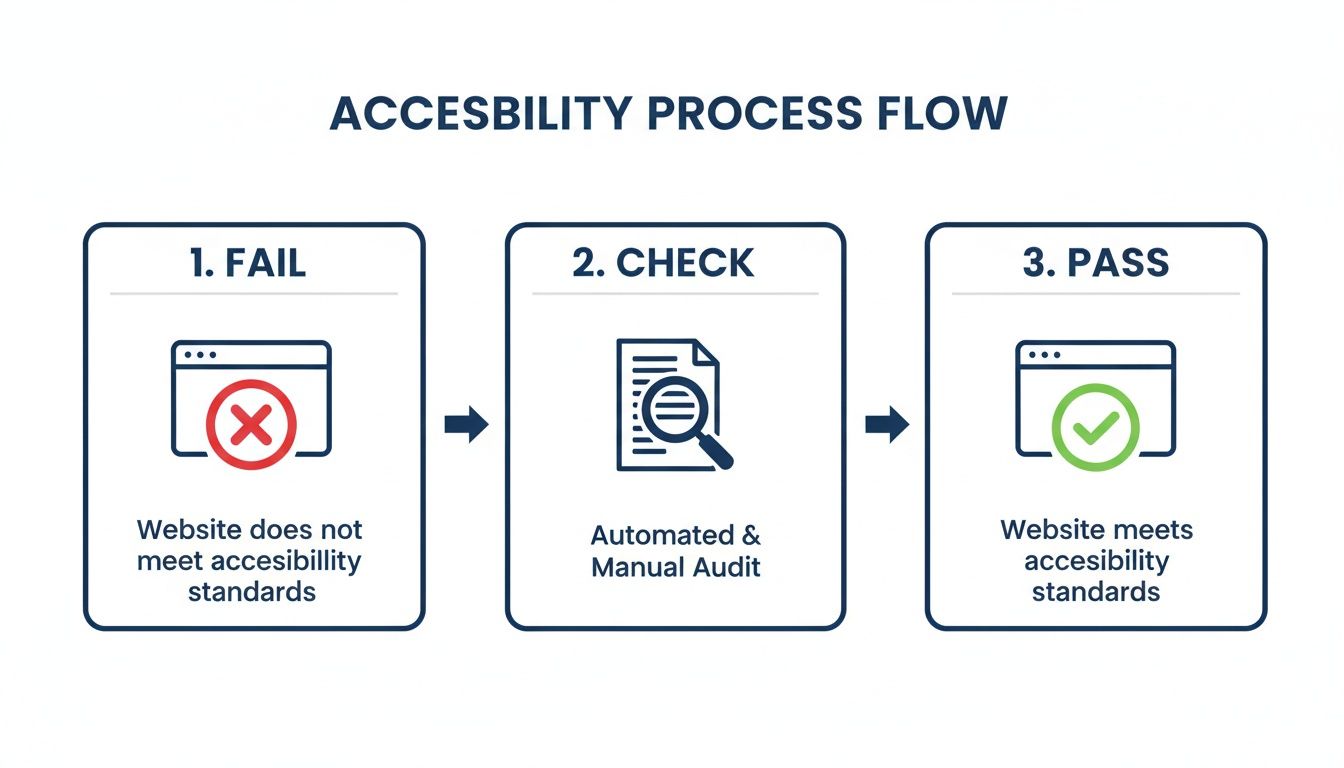
As you can see, the audit is the critical step that transforms a non-compliant site into one that meets accessibility standards.
Creating a Strategic Remediation Plan
Once you know where the issues are, the next step is to create a smart plan to address them efficiently. This is where an experienced digital partner can guide you in prioritizing the most critical, high-risk issues first. This approach delivers the biggest impact and the most legal protection right away.
This isn't about a complete website overhaul. It’s a strategic remediation process where developers carefully correct code and design elements to meet WCAG 2.1 AA standards. The end result is a seamless transition to a fully accessible—and much more robust—website. Often, these fixes also improve your site’s performance and overall user experience.
"A proactive accessibility plan isn't an expense; it's an investment in your brand's reputation and reach. It demonstrates a commitment to inclusivity that customers notice and appreciate, building loyalty and trust."
An effective plan also considers your team's workflow. The audit and remediation process provides valuable insights, helping your content creators and developers learn how to maintain accessibility as they add new pages, products, or blog posts in the future.
The Importance of Ongoing Monitoring
Your website is a dynamic asset. Every time you add a new product, publish a blog post, or update a page, you risk unintentionally creating a new accessibility barrier. That's why a one-time fix is never enough. To remain compliant for the long term, ongoing monitoring is essential.
A solid maintenance plan typically includes:
- Regular Automated Scans: These quick checks can flag common issues before they become significant problems.
- Periodic Manual Audits: Scheduling a full manual audit annually or after any major site redesign ensures you stay on top of more complex issues.
- Team Training: Equipping your team with basic accessibility knowledge is the most effective way to prevent new barriers from being introduced.
This proactive approach is similar to how you would maintain your business's physical security. In fact, you can see how we handle digital vulnerabilities in our guide to identifying common website security vulnerabilities.
Taking the next step is simple. It all starts with a conversation to understand your needs and goals. We’re here to provide a positive, solution-focused path that removes uncertainty, helping you protect and grow your business. Reach out today, and let’s start building a more inclusive digital future together.
Frequently Asked Questions
When it comes to website ADA compliance requirements, many questions arise. It’s easy for business owners to get caught up in technical jargon and legal gray areas while trying to determine the right course of action. Here, we provide clear, direct answers to the most common questions we hear, so you can move forward with confidence.
Making your website accessible is about opening your doors to every potential customer. Let's break down the practical side of things so you can make smart decisions that protect and grow your business.
Does My Small Business Website Really Need to Be ADA Compliant?
Yes, it absolutely does. The Americans with Disabilities Act (ADA) applies to businesses that serve the public, and courts have consistently ruled that websites are "places of public accommodation." There is no exemption based on company size or revenue.
In fact, small businesses are often targeted for demand letters and lawsuits precisely because they are perceived as less likely to have addressed digital accessibility. Making your site compliant is not only the best defense but also a savvy business move that welcomes millions of customers you might otherwise be excluding.
Can I Just Use an Accessibility Widget to Become Compliant?
Unfortunately, the answer is no. Accessibility widgets and overlays are often marketed as a quick, one-click solution, but they do not provide true, code-level compliance. Many legal experts and disability advocates actively advise against them, and they have been cited in lawsuits as ineffective.
These tools typically fail to fix the deep, structural problems in a website's code. Worse, they can sometimes interfere with the very assistive technologies they are meant to support, creating an even more frustrating experience for the user.
The only legally sound and reliable path is to actually fix your website's code to meet WCAG 2.1 AA standards. Real accessibility has to be built into your site's foundation, not just slapped on top like a temporary patch.
Relying on a widget can create a false sense of security while leaving your business exposed to the legal risks you were trying to avoid.
What Is the Difference Between ADA and WCAG?
This is a common point of confusion, but it's quite simple when you break it down.
Think of it this way:
- The ADA is the "what." It's the American civil rights law that prohibits discrimination against people with disabilities. It mandates that your business be accessible, but it doesn't provide the technical blueprint for your website.
- WCAG is the "how." The Web Content Accessibility Guidelines (WCAG) are the global technical standards that explain how to make a website accessible.
In legal cases, the Department of Justice and U.S. courts consistently refer to WCAG 2.1 Level AA as the benchmark for determining if a website is ADA compliant. Therefore, to follow the law (the ADA), you need to implement the technical roadmap (WCAG).
How Much Does It Cost to Make a Website ADA Compliant?
There is no one-size-fits-all price, as the cost depends entirely on your specific website. The investment is determined by a few key factors:
- Your website's size and complexity: A simple five-page informational site will cost significantly less to remediate than a large e-commerce store with thousands of products and complex user accounts.
- The number of issues found: A comprehensive audit might uncover a few issues or hundreds. The more barriers present, the more development time is needed to fix them.
- The technology it’s built on: A site built on a common platform like WordPress or Shopify may require a different approach than a fully custom-coded application.
The process typically begins with a detailed audit to identify every accessibility issue. That audit provides the necessary roadmap for an accurate quote. While it is an upfront investment, it is almost always a fraction of the cost of litigation. A lawsuit can easily cost tens of thousands of dollars in legal fees and settlements—not to mention the damage to your brand and lost business. Proactive compliance is a much more predictable and cost-effective path.
If you're feeling unsure about your website's compliance or just don't know where to start, you're not alone. The team at Studio Blue Creative is here to bring clarity and a straightforward plan to the table. We can help you understand your specific risks and create a practical roadmap for a more inclusive and legally sound digital presence.
Ready to turn a compliance worry into a business advantage? Contact us today for a consultation and let’s start the conversation.
Find out if ChatGPT recommends your business.
Right now, your customers are asking AI for recommendations. The AI is naming somebody. Is that name yours? Run our free AEO Scorecard — we test 3 of your real queries against ChatGPT and Claude and email you a personalized report.
