
Quick answer: A WooCommerce ecommerce website for a small business typically costs between $1,500 and $15,000 to build, depending on complexity, and $500–$3,000 per year to maintain. The WooCommerce plugin itself is free, but you'll pay for hosting ($15–$80/month), a premium theme ($0–$200), extensions ($50–$500/year), payment processing (2.9% + $0.30 per transaction with Stripe), and developer time. Understanding every line item before you launch prevents budget surprises and helps you invest wisely in a store built to grow.
1. Why WooCommerce Is the Go-To Platform for Small Business Ecommerce
Before diving into dollar figures, it helps to understand why WooCommerce dominates small-business ecommerce — and what that dominance means for your budget. The platform’s open-source roots keep the baseline cost low, while its massive ecosystem keeps your long-term options wide open.
Market Share and Credibility
WooCommerce powers approximately 36% of all online stores worldwide as of 2024, making it the single most-used ecommerce platform on the internet. It runs on WordPress, which itself powers 43% of every website on the web. That combination means an enormous ecosystem of developers, themes, plugins, and tutorials — all working in your favor when something needs to be fixed or upgraded.
For small businesses in Nashville, Franklin, Jackson, and across Tennessee, WooCommerce offers a crucial advantage: full ownership of your store and data. Unlike hosted platforms such as Shopify, you are never locked into a proprietary system or subject to sudden price hikes.
Open-Source = Lower Baseline Cost
Because WooCommerce is open-source and free to download, the platform itself costs $0. That’s a meaningful starting point. You won’t pay a monthly SaaS subscription just to exist. Instead, your spending goes toward the infrastructure and features you actually choose — hosting, design, extensions, and professional help. This modular cost structure is ideal for small businesses that need to scale spending alongside revenue.
The flip side is that open-source requires more active management. Security patches, plugin updates, and performance tuning are your responsibility (or your developer’s). We’ll cover the ongoing cost of that maintenance in Section 9.
2. The Real Cost Breakdown: What You're Actually Paying For
The phrase “WooCommerce is free” is technically true and practically misleading. The plugin has no license fee, but a finished, functional online store is assembled from many paid components. Here’s how to think about each one.
One-Time Build Costs vs. Recurring Costs
WooCommerce costs fall into two buckets. One-time build costs include design, development, initial content entry, and setup. Recurring costs include hosting, domain renewal, plugin licenses, payment processing fees, and ongoing maintenance. Conflating the two is the most common budgeting mistake small business owners make.
- One-time build range: $1,500 – $15,000+
- Annual recurring range: $500 – $3,000+
- Payment processing: 2.9% + $0.30 per transaction (Stripe/PayPal standard rates)
A realistic mid-range small business store — 50–200 products, custom theme, basic SEO setup — lands around $4,000–$7,000 to build and $1,200–$2,000/year to maintain.
Who Sets the Price: DIY vs. Freelancer vs. Agency
Your biggest cost lever is who builds the site. Three tiers exist:
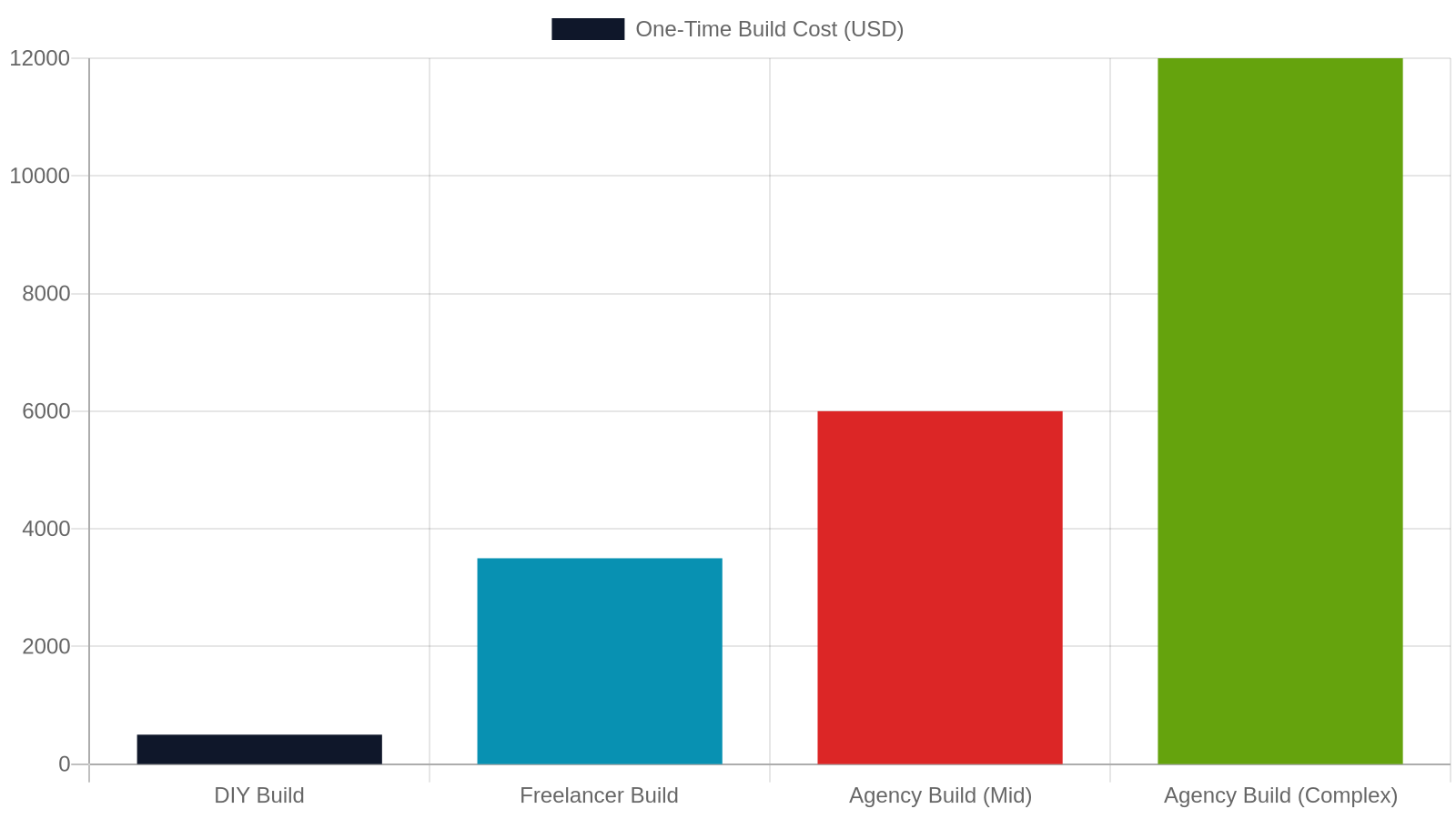
- DIY (page builder + free theme): $200–$800 total. High time investment, limited customization, higher risk of technical issues.
- Freelance developer: $1,500–$6,000. Good for straightforward stores. Vetting quality can be difficult.
- Full-service digital agency: $4,000–$15,000+. Includes strategy, design, development, SEO foundation, and post-launch support. Best ROI for businesses serious about growth.
For businesses across the Nashville Metro and West Tennessee, working with a local agency means faster communication, in-person discovery sessions, and accountability that overseas freelance marketplaces rarely provide.
3. Hosting: The Foundation Your Store Runs On

Hosting is the single most impactful infrastructure decision you’ll make. A slow or unreliable host directly costs you sales — studies show a 1-second delay in page load time reduces conversions by up to 7%. Choosing the right tier from day one saves money and headaches later.
Shared Hosting vs. Managed WordPress Hosting
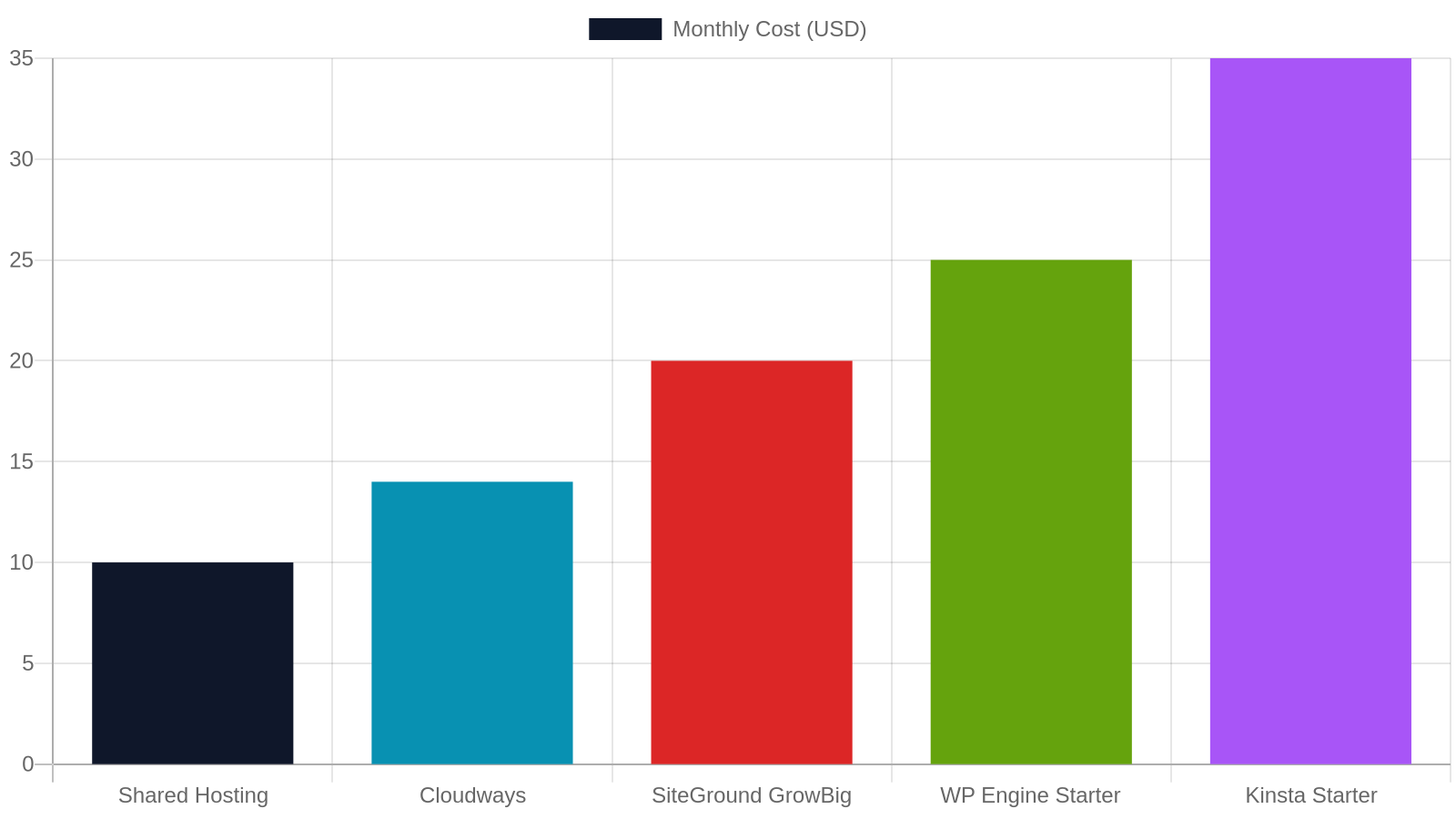
Shared hosting (Bluehost, HostGator) costs $5–$15/month but puts your store on a server shared with hundreds of other websites. For ecommerce, this creates real risks: slow load times during traffic spikes, security vulnerabilities from neighbor sites, and limited server resources during checkout — exactly when you need reliability most.
Managed WordPress hosting (WP Engine, Kinsta, Cloudways) costs $25–$80/month but includes automatic updates, daily backups, staging environments, and servers optimized specifically for WooCommerce. For any store processing real transactions, managed hosting is the professional standard.
Recommended Hosting for WooCommerce Stores
Based on performance benchmarks and real-world small business deployments:
- Cloudways (DigitalOcean 2GB): ~$14/month — best value for growing stores
- WP Engine Starter: ~$25/month — excellent support, automatic backups
- Kinsta Starter: ~$35/month — premium speed, Google Cloud infrastructure
- SiteGround GrowBig: ~$20/month — good mid-tier option with caching built in
Don’t forget your domain name: typically $12–$18/year through Namecheap or Google Domains. A free SSL certificate (required for ecommerce) is included with most managed hosts.
4. Themes and Design: What Makes Your Store Look Credible

Your store’s design is your digital storefront window. Research from Stanford’s Web Credibility Project found that 75% of users judge a business’s credibility based on website design alone. Fortunately, WooCommerce gives you a wide range of design options across every budget tier.
Free Themes vs. Premium Themes
WordPress.org hosts hundreds of free WooCommerce-compatible themes. Storefront (the official WooCommerce theme) is free, lightweight, and a solid starting point. However, free themes often require significant developer customization to match your brand — which can cost more in developer hours than simply buying a premium theme upfront.
Premium themes from marketplaces like ThemeForest or Elegant Themes cost $39–$199 one-time. Popular WooCommerce-optimized options include Flatsome ($59), Astra Pro ($59/year), and Divi ($89/year). These include built-in page builders, pre-made shop layouts, and dedicated WooCommerce styling — reducing custom development time considerably.
Custom Design: When It's Worth the Investment
A fully custom design — where a designer creates original wireframes and visual comps before a developer builds them — typically adds $1,500–$4,000 to your project. This investment makes sense when:
- Your brand identity is a core competitive differentiator
- You’re in a crowded market where visual trust signals matter (jewelry, fashion, specialty food)
- You’re migrating from an existing store and need to preserve or elevate brand equity
For most first-time WooCommerce stores, a well-configured premium theme with brand colors, custom logo, and professional product photography delivers 90% of the credibility benefit at a fraction of the cost.
5. WooCommerce Extensions: The Features That Cost Extra

The WooCommerce plugin directory lists over 800 official extensions, and thousands more exist on third-party marketplaces. Knowing which ones you actually need — and which are nice-to-haves — is critical to keeping your annual software costs under control.
Essential Extensions Most Stores Need
WooCommerce’s core handles basic product listings and checkout. Most real-world stores need additional extensions to function properly. Common must-haves include:
- WooCommerce Subscriptions: $279/year — for recurring billing models
- WooCommerce Bookings: $249/year — for appointment-based businesses
- YITH WooCommerce Wishlist: $94/year — increases return visits
- WooCommerce Product Add-Ons: $79/year — custom product options
- Shipping plugins (ShipStation, WooCommerce Shipping): $0–$50/month
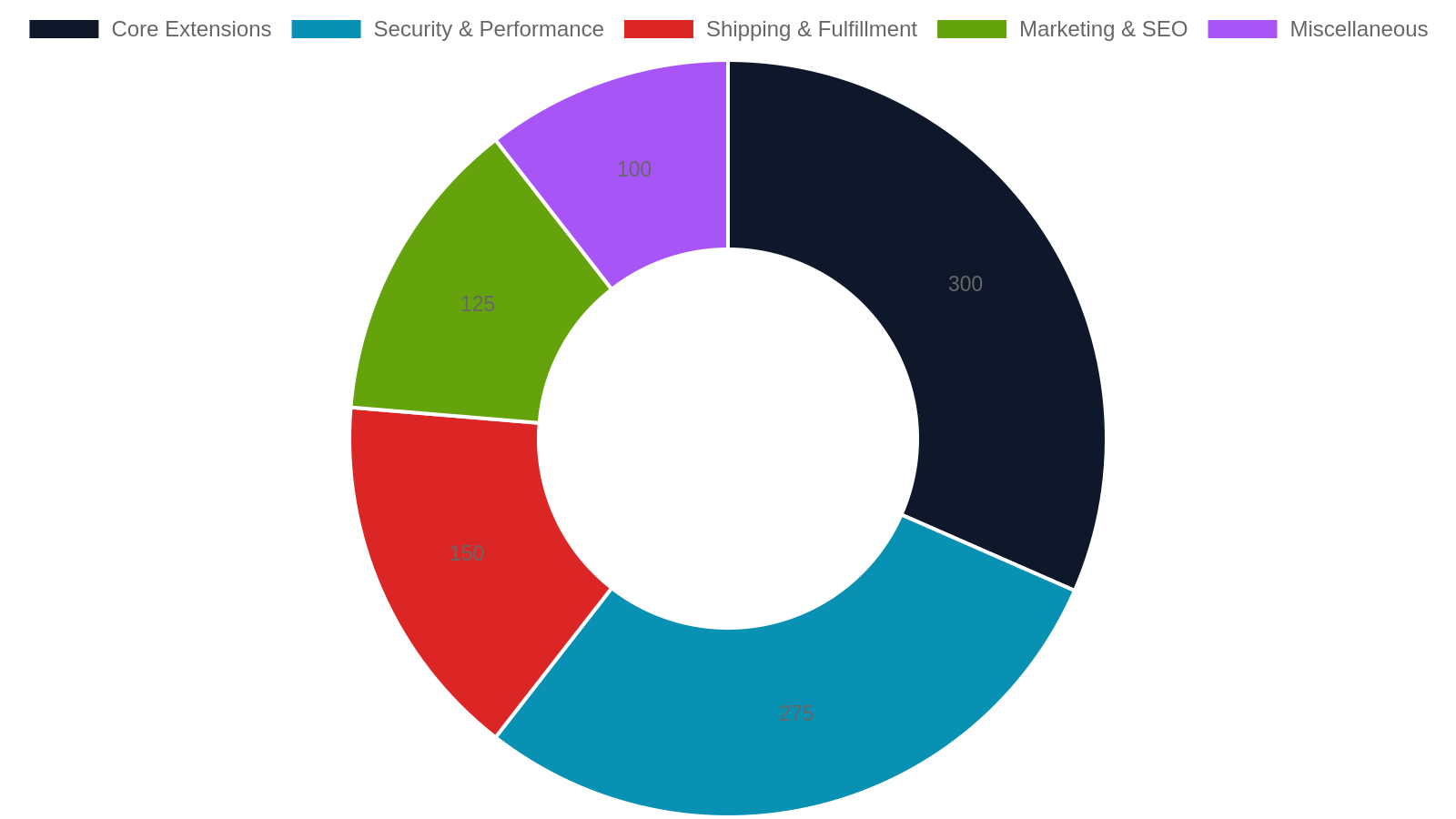
Budget $150–$500/year for a typical extension stack. Avoid the temptation to install every free plugin you find — plugin bloat is one of the top causes of slow WooCommerce stores.
Security and Performance Plugins
Security is non-negotiable for any store handling payment data. Essential security and performance tools include:
- Wordfence Security (Free/Premium $119/year): firewall and malware scanning
- WP Rocket ($59/year): caching and performance optimization — can improve load time by 30–50%
- UpdraftPlus Premium ($70/year): automated off-site backups
- Cloudflare (Free tier available): CDN and DDoS protection
Total security + performance stack: approximately $200–$350/year. This is not optional spending — a single security breach or data loss event costs far more than a year of protection.
6. Payment Processing: The Fee That Never Stops

Payment processing is the one cost that scales directly with your revenue — and it’s often underestimated in initial budgets. Understanding the fee structures before you launch helps you price products correctly and choose the right gateway for your volume.
Standard Payment Gateway Rates
Every transaction your store processes incurs a payment gateway fee. The major options and their standard rates:
- Stripe: 2.9% + $0.30 per transaction (most popular for WooCommerce)
- PayPal Checkout: 3.49% + $0.49 per transaction (standard rate)
- Square: 2.9% + $0.30 online
- Authorize.net: $25/month + 2.9% + $0.30
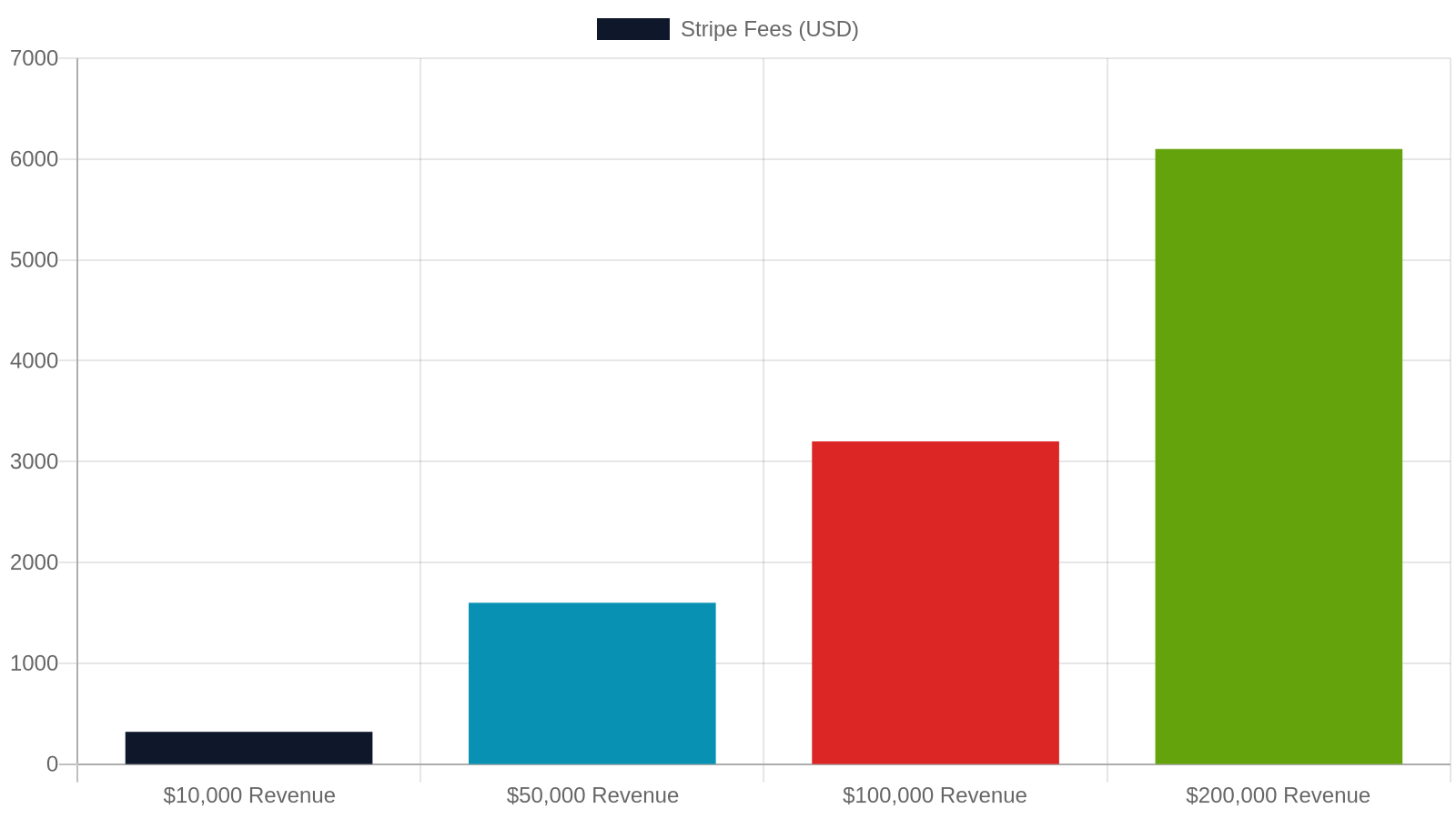
On $50,000 in annual revenue, Stripe fees alone total approximately $1,600/year. At $200,000 in revenue, that’s $6,100/year. Factor this into your pricing model from day one — it’s a real cost of doing business online.
WooCommerce Payments vs. Third-Party Gateways
WooCommerce Payments (powered by Stripe) is the native option and integrates seamlessly into your dashboard. It charges the same 2.9% + $0.30 as Stripe directly, with no additional monthly fee. The advantage is consolidated reporting — refunds, disputes, and payouts all managed inside WordPress.
For businesses processing over $10,000/month, it’s worth negotiating custom rates with Stripe or exploring interchange-plus pricing through Authorize.net, which can reduce effective rates by 0.3–0.5%. At scale, that difference is meaningful.
7. SEO, AEO, and GEO: Getting Found After You Launch

Building the store is step one. Step two — and the step most small businesses underinvest in — is making sure customers can actually find it. Search visibility for ecommerce requires a specific, ongoing strategy that goes well beyond installing the Yoast SEO plugin.
Why Ecommerce SEO Is Different
A WooCommerce store that nobody can find is an expensive digital warehouse. Ecommerce SEO involves optimizing product pages, category pages, site architecture, and schema markup — all of which are distinct from standard blog or service-page SEO. Key ecommerce SEO tasks include:
- Product schema markup (price, availability, reviews) for rich results
- Category page optimization with unique, keyword-rich copy
- Internal linking between related products and categories
- Page speed optimization (Core Web Vitals directly impact rankings)
- Review acquisition strategy for social proof and SEO signals
Professional ecommerce SEO services typically cost $500–$2,000/month for a small business store, depending on catalog size and competition.
Answer Engine and Generative Engine Optimization for Ecommerce
In 2025, appearing in Google’s AI Overviews, ChatGPT shopping suggestions, and Perplexity product recommendations is increasingly valuable. Answer Engine Optimization (AEO) and Generative Engine Optimization (GEO) help your products and store get cited by AI systems when shoppers ask questions like “best handmade candles in Nashville” or “where to buy custom leather goods in Tennessee.”
This requires structured data, authoritative product descriptions, FAQ content on product pages, and a strong local entity footprint. Our AEO services for Tennessee businesses are specifically designed to position your WooCommerce store for this next generation of search — not just traditional Google rankings.
WooCommerce vs. Competing Ecommerce Platforms: 6-Point Comparison
Choosing WooCommerce over alternatives like Shopify, Squarespace Commerce, or BigCommerce depends on your priorities. Here's how the major platforms stack up across the factors that matter most to small businesses.
8. Product Photography and Content: Hidden Costs That Drive Sales

Two line items that rarely appear in agency quotes but dramatically affect your store’s performance: photography and copywriting. These are not optional extras — they are the core of what converts a browser into a buyer.
Professional Product Photography Costs
Product photography is consistently cited as the #1 factor in online purchase decisions. Yet it’s routinely left out of initial WooCommerce budgets. Professional product photography in the Nashville area typically runs:
- Simple product shots (white background): $25–$75 per product
- Lifestyle/styled photography: $150–$400 per setup
- Full catalog shoot (50 products): $1,500–$4,000
For stores with physical products, budget at minimum $500–$1,500 for photography before launch. Poor product images directly suppress conversion rates — Shopify research shows stores with professional images convert at 2–3x the rate of stores using amateur photos.
Product Descriptions and Copywriting
Every product page needs a description that sells, ranks, and answers customer questions. Professional ecommerce copywriting costs $25–$75 per product description when outsourced. For a 100-product store, that’s $2,500–$7,500 in content alone.
AI-assisted content tools can reduce this cost significantly, but require human editing for accuracy, brand voice, and SEO precision. A hybrid approach — AI drafts, human refinement — is the current best practice for small businesses managing content budgets. Structured product content also feeds directly into AEO and GEO performance, making it a dual-purpose investment.
9. Ongoing Maintenance: The Annual Cost of Keeping Your Store Healthy

Many small businesses budget carefully for the build and then treat ongoing maintenance as optional. This is one of the most expensive mistakes in ecommerce. Your WooCommerce store requires regular professional attention to stay secure, fast, and legally compliant — especially if you’re handling customer payment data.
What Maintenance Actually Covers
A WooCommerce store is a living system. WordPress core, WooCommerce, themes, and plugins all release updates regularly — and incompatible updates are one of the leading causes of store downtime. Professional maintenance plans typically include:
- Weekly plugin and core updates with compatibility testing
- Daily automated backups with off-site storage
- Monthly security scans and uptime monitoring
- Performance audits and database optimization
- Minor content updates (product changes, pricing, banners)
Agency maintenance plans for WooCommerce stores run $100–$400/month depending on scope. DIY maintenance is possible but requires technical confidence and consistent time commitment.
The True Cost of Neglecting Maintenance
Skipping maintenance is a false economy. The average cost to recover a hacked WordPress site is $1,500–$5,000 including forensic cleanup, data restoration, and reputation repair. A single WooCommerce version conflict that breaks checkout can cost hundreds to thousands in lost sales per hour of downtime.
For context: IBM’s 2023 Cost of a Data Breach Report found the average cost of a small business data breach was $3.31 million — though most small ecommerce breaches are far smaller in scope, even a $5,000–$15,000 incident is devastating for a small business. Prevention is always cheaper than recovery.
10. Total Cost Summary: What to Budget at Each Stage

Now that we’ve walked through every cost component, let’s assemble the full picture. Understanding your total year-one investment — and how it breaks down — is the foundation of a realistic business case for your WooCommerce store.
Year-One Total Cost Scenarios
Pulling all cost components together, here are realistic year-one totals for three common small business scenarios:
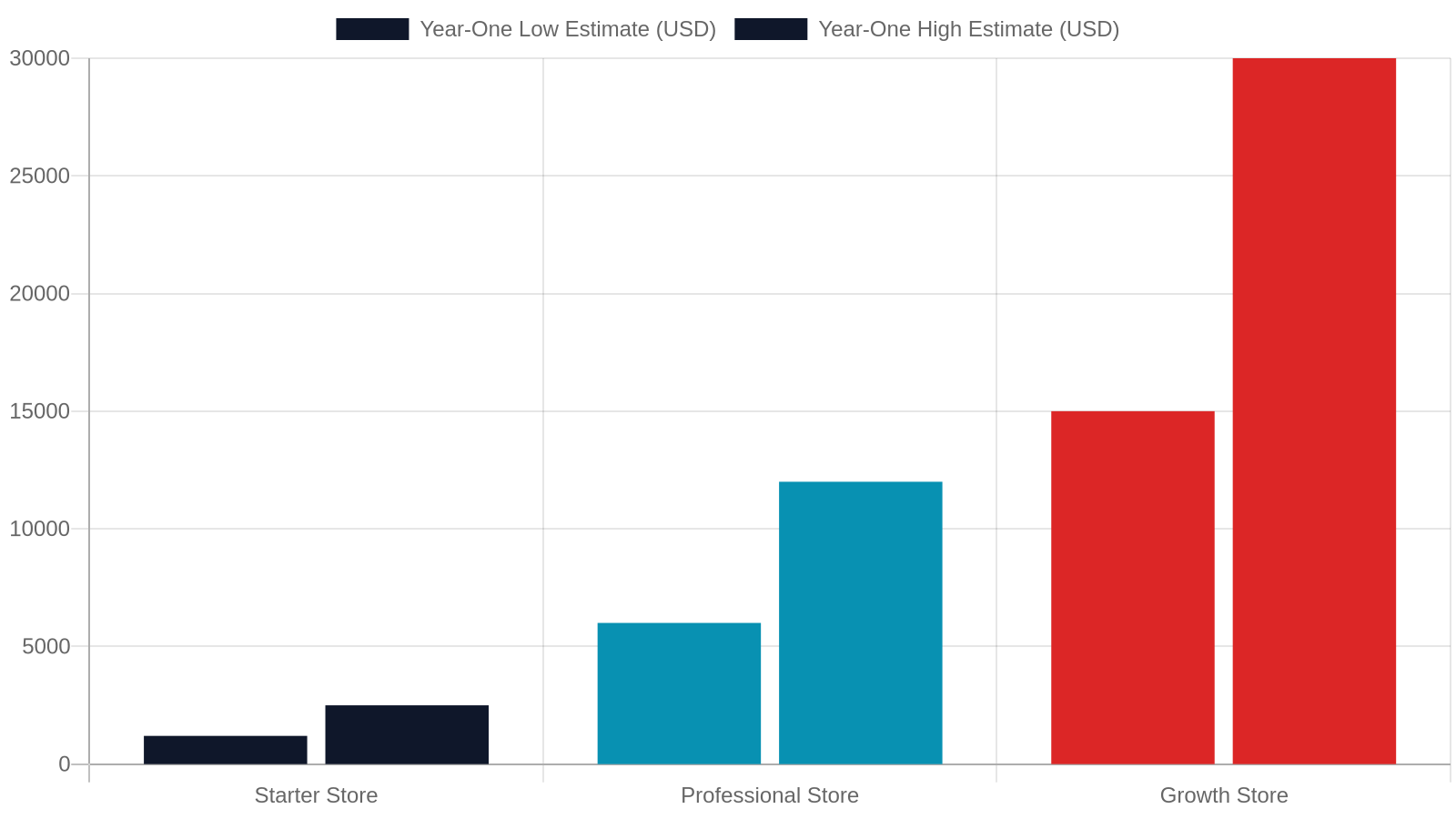
- Starter Store (DIY, 20 products): $1,200–$2,500 total (hosting + theme + extensions + domain + payment fees on modest volume)
- Professional Store (Freelancer/Agency, 50–100 products): $6,000–$12,000 total (build + hosting + extensions + photography + SEO foundation)
- Growth Store (Agency, 100–500 products, SEO ongoing): $15,000–$30,000 year one (full build + photography + content + ongoing SEO retainer)
These ranges assume a U.S.-based store targeting a regional market — consistent with most Nashville Metro and West Tennessee businesses we work with.
Where to Invest vs. Where to Save
Not all spending is equal. Here’s where to prioritize your budget:
- Invest heavily: Hosting quality, product photography, SEO/AEO strategy, developer experience
- Invest moderately: Premium theme, core extensions, copywriting
- Save smartly: Start with fewer products and expand; use free tier of security tools initially; delay subscriptions/bookings plugins until you need them
The single highest-ROI investment for most small ecommerce businesses is professional SEO and AEO from day one — because a store that ranks and gets cited by AI systems generates compounding returns every month. Explore our full digital services for Tennessee small businesses to see how we approach ecommerce growth holistically.
Ready to Launch Your WooCommerce Store in Tennessee?

You now have a complete, honest picture of what a WooCommerce ecommerce website costs — from the first line of code to year-three maintenance. The next step is getting a real number for your specific project, from a team that knows the Tennessee market.
What to Expect From a Free Estimate
At Studio Blue Creative, we provide free, no-obligation estimates for WooCommerce ecommerce projects across the Nashville Metro — including Franklin, Brentwood, Murfreesboro, Hendersonville, and Mount Juliet — as well as Jackson and surrounding West Tennessee communities. Our estimates are itemized, transparent, and built around your specific product catalog, target audience, and revenue goals.
We don’t believe in one-size-fits-all pricing. A boutique with 15 handmade products has different needs than a regional distributor with 400 SKUs. Your estimate reflects your actual project — not a template quote.
Your Next Step
The best time to get your WooCommerce store built correctly is before you launch — not after you’ve spent months on a platform that doesn’t perform. Whether you’re starting from scratch or migrating from Shopify, Squarespace, or a custom solution, our team handles the full stack: design, development, SEO, AEO, and ongoing maintenance.
Call us today at 731-402-0402 to speak with a Tennessee-based ecommerce specialist, or request a free estimate for your West Tennessee ecommerce project online. We’re ready to help your store get found, get trusted, and get sales.
Frequently Asked Questions
How much does it cost to build a WooCommerce website for a small business?
A small business WooCommerce store typically costs $1,500–$15,000 to build, depending on the number of products, level of custom design, and whether you hire a freelancer or agency. A realistic mid-range project — 50–200 products, professional design, and basic SEO — runs $4,000–$7,000.
Is WooCommerce really free?
The WooCommerce plugin itself is free to download and install. However, you'll still pay for web hosting ($14–$80/month), a domain name (~$15/year), premium themes ($0–$200), extensions ($150–$500/year), and payment processing fees (2.9% + $0.30 per transaction with Stripe). Total first-year costs typically range from $1,200 to $30,000 depending on scope.
How much does WooCommerce cost per month to maintain?
Ongoing monthly costs for a WooCommerce store include hosting ($14–$80), plugin licenses (amortized ~$80/month), payment processing fees (variable), and optional maintenance plans ($100–$400/month). Most small businesses spend $300–$600/month in total recurring costs, excluding payment processing.
Is WooCommerce better than Shopify for small businesses?
WooCommerce is generally better for small businesses that want full ownership of their data, unlimited customization, and lower platform fees at scale. Shopify is better for businesses that want a faster setup with less technical management. WooCommerce's open-source nature means no proprietary lock-in and no platform transaction fees beyond your payment gateway.
What payment gateway should I use with WooCommerce?
Stripe (via WooCommerce Payments) is the most popular choice, charging 2.9% + $0.30 per transaction with no monthly fee and seamless WordPress integration. PayPal Checkout is a good secondary option. For stores processing over $10,000/month, it's worth contacting Stripe directly to negotiate lower custom rates.
Can I build a WooCommerce store myself without a developer?
Yes, but it requires time and technical learning. DIY builds using a page builder and free theme can cost as little as $200–$800, but often result in slower sites, security gaps, and limited scalability. For businesses serious about ecommerce revenue, professional development typically pays for itself through better performance, SEO, and conversion rates.
Find out if ChatGPT recommends your business.
Right now, your customers are asking AI for recommendations. The AI is naming somebody. Is that name yours? Run our free AEO Scorecard — we test 3 of your real queries against ChatGPT and Claude and email you a personalized report.
Ready for a real website?
Get a tailored 3-tier proposal in under a minute — including our Launch Deal ($699), a custom build, or our SEO Growth Package. No call required.